FAQ's
How do I create an account?
Click the User icon in the top righthand corner on the home page and select ’Register’. Enter your email where instructed, a verification email will be sent to the email address given. When you receive the email click ‘Verify Email’ and follow the instructions once directed back to the tptvencore.co.uk website. If you can’t see the verification email to change your password in your normal Inbox, please check your spam / junk / archive folders, or even your deleted folder.

What should I do if I don’t receive a confirmation email after registering?
Check your spam / junk / archive folders to see whether the email has gone into there. If it isn’t there, then try registering again and be careful to ensure that you use the correct email address.
How do I subscribe for commercial free viewing?
Follow the below steps:
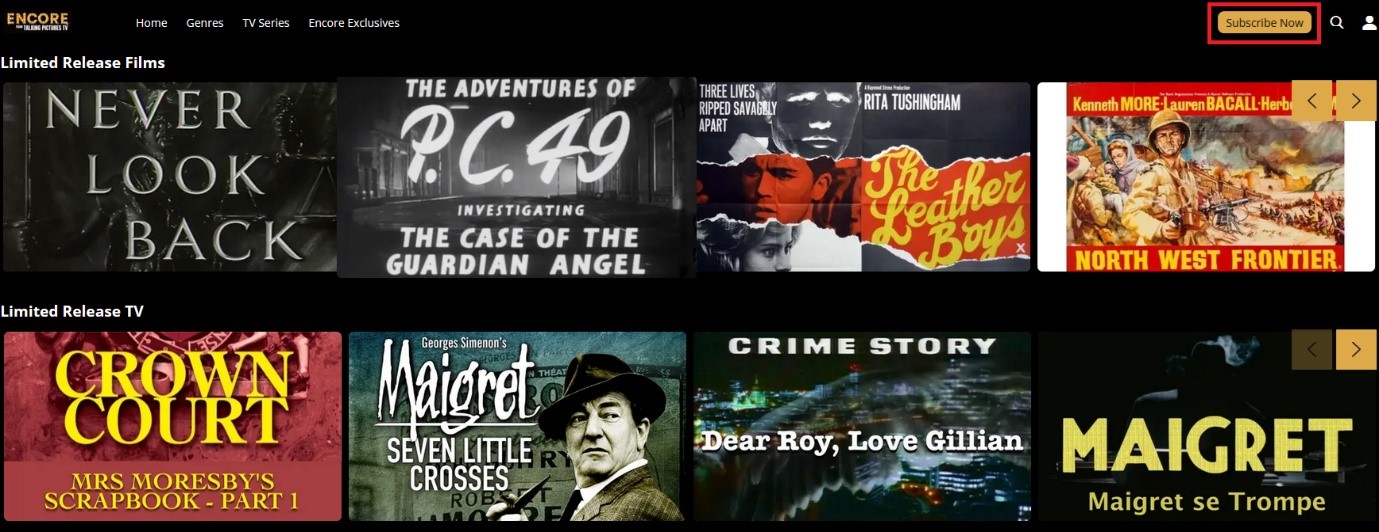
- Navigate to tptvencore.co.uk and click on the ‘Subscribe Now’ button as shown below.
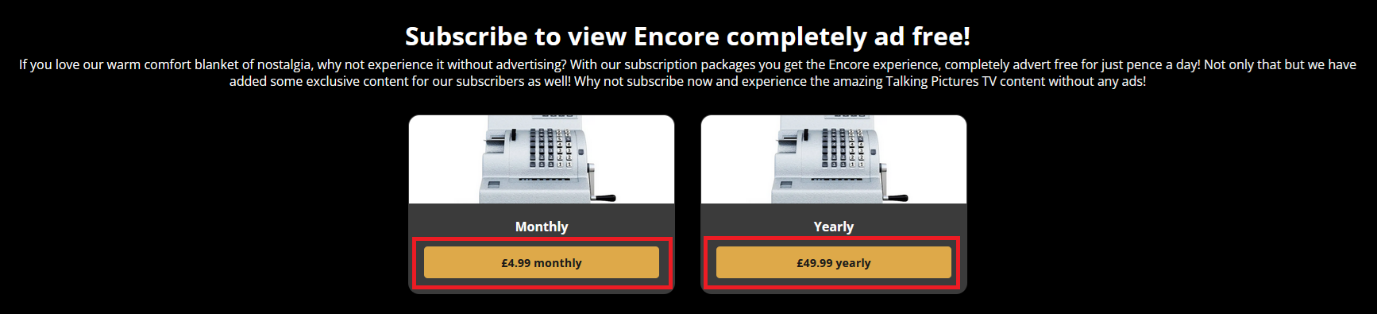
- Choose the subscription that you’d like to purchase, either the monthly subscription at £4.99 per month or £49.99 for 12 months.
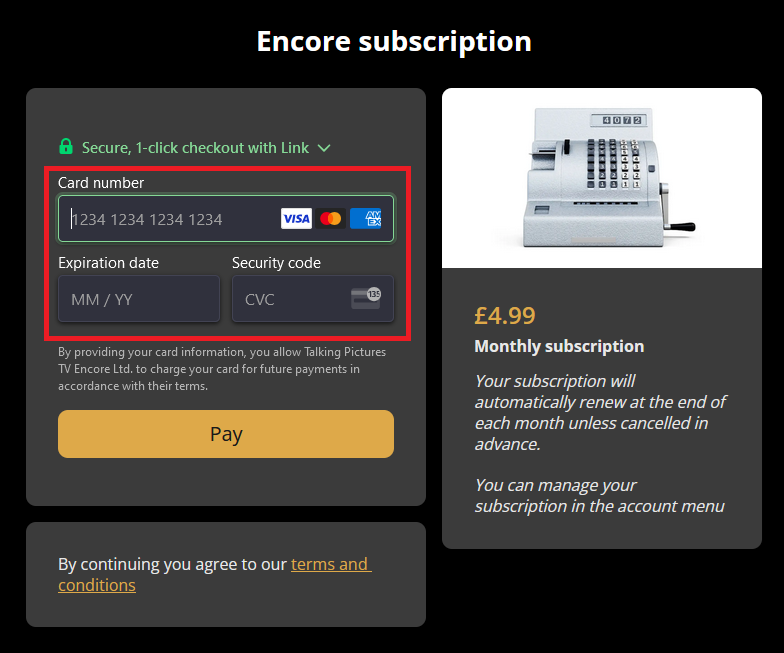
- Enter your debit or credit card details in the boxes provided and press the ‘Pay’ button. (Users may be asked to verify the payment with their card provider)
- You’re now subscribed and ready to enjoy TPTV Encore completely, 100% free of adverts. Just press the ‘Continue’ button and you’ll be directed back to the homepage to select the film or TV show you’d like to watch.

Where can I subscribe for commercial free viewing?
Users can only subscribe via the tptvencore.co.uk homepage. For our red button via Freeview 82, Amazon Firestick, Fire TV, Android TV or Apple IOS users please visit tptvencore.co.uk to subscribe, and then when you reopen your TPTV Encore app and log in, or pair your device, to your account the subscription benefits will automatically be applied for commercial free viewing on your app.
How do I pair my TV for commercial viewing on the Red Button service, via Freeview 82?
Users are now able to enjoy 100% ad free viewing on our red button service via Freeview 82. Follow the below instructions to enjoy the subscription benefits! It’s a simple process that takes only minutes, and you only have to do it once.
Firstly, when the service is open press the blue button.

This will open the below window. Non-subscriber users will be promoted to subscribe at tptvencore.co.uk/subscribe.
Once subscribed, and for those already subscribed press the green button to access your unique 6 letter code.

Scan the QR code using a smart phone, or visit tptvencore.co.uk/pair and enter the code in the boxes provided.


Once the code is accepted your TV will automatically refresh within seconds and you’re ready to enjoy your favourite Talking Pictures film and TV all 100% ad free.

How do I cancel my subscription?
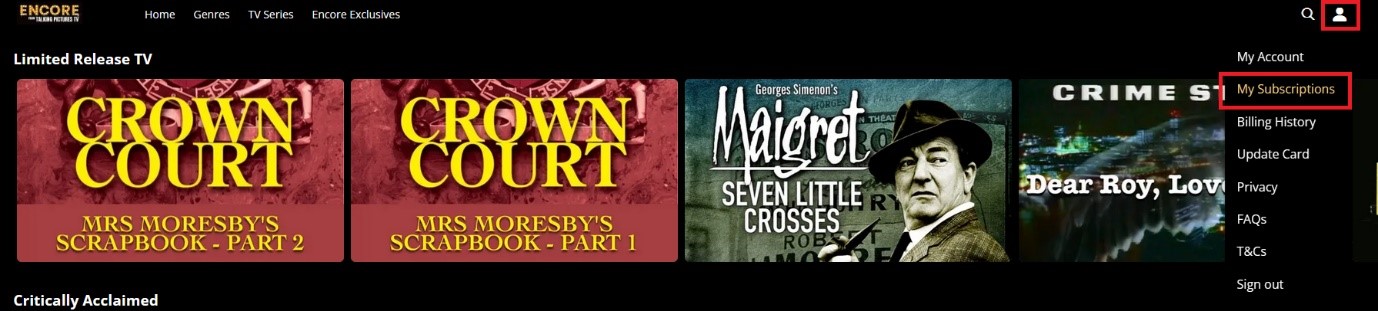
Subscribers can cancel their subscription at any time. Simply click on the ‘User Option’ button from the tptvencore.co.uk homepage and select ‘My Subscriptions’, as shown below.
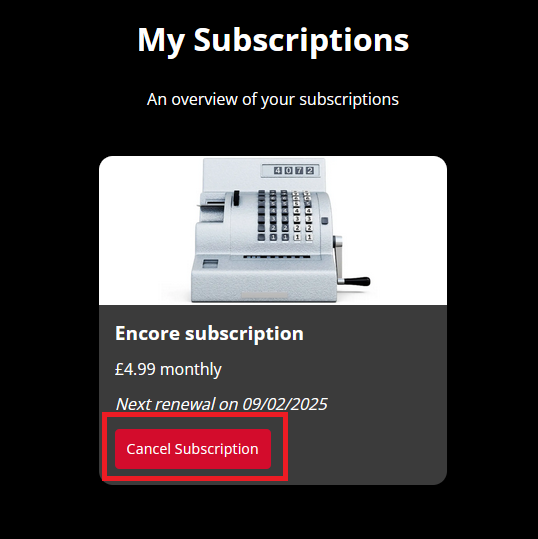
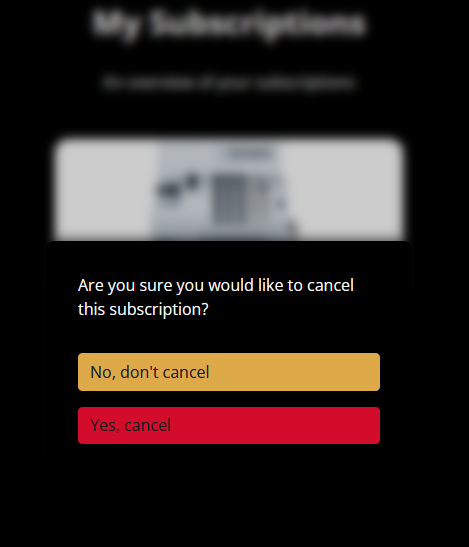
 This will show users their subscription information, including their renewal date. Users that wish to cancel their subscription should click on the ‘Cancel Subscription’ button, and then confirm the cancellation by selecting ‘Yes, cancel’ when prompted (shown below). Once completed the subscription has been cancelled and will not be charged again on the original renewal date. Users that cancel their subscription will still have the benefits of their subscription until the original renewal date is reached. For example, if a subscription renewal date is set for 14 days after the cancellation takes place, viewers will still have commercial free viewing until those 14 days have passed. After the 14 days have passed users will still be able to watch TPTV Encore, however, ads will be shown before and during anything viewed.
How do I turn on Subtitles?
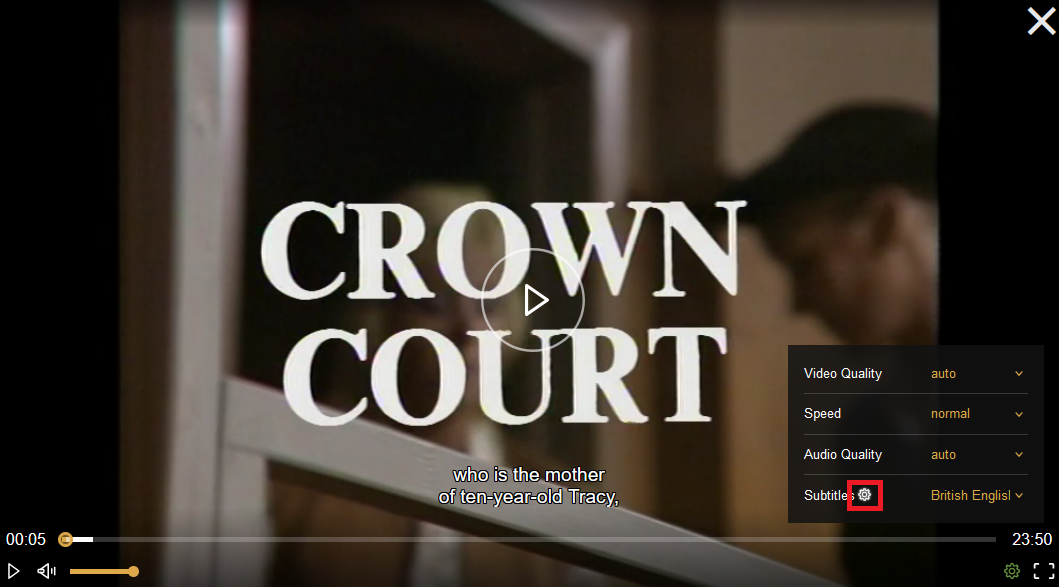
If subtitles are available this will be stated in the description of the programme. Start the player and in the bottom left-hand corner you’ll see a Settings wheel. Click there and select British English from the Subtitle option.
How do I make subtitles bigger or change their colour?
Once subtitles are switched on, their colour and size can be changed to suit the individual users. To do this, click on the ‘Subtitle setting’ button, as shown below.
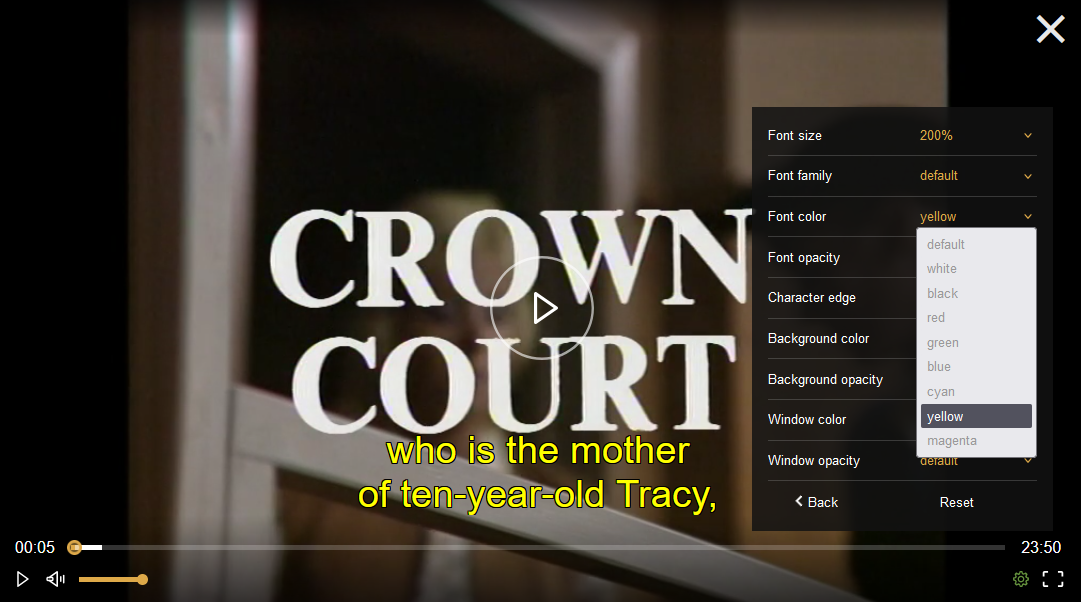
This will bring up a lot of options for users to customise their subtitles by using the drop-down menus. Here we have changed the subtitles yellow and increased the size to 200% of original size.
Red Button FAQ's
Who can receive the Encore via the Red Button on Freeview?
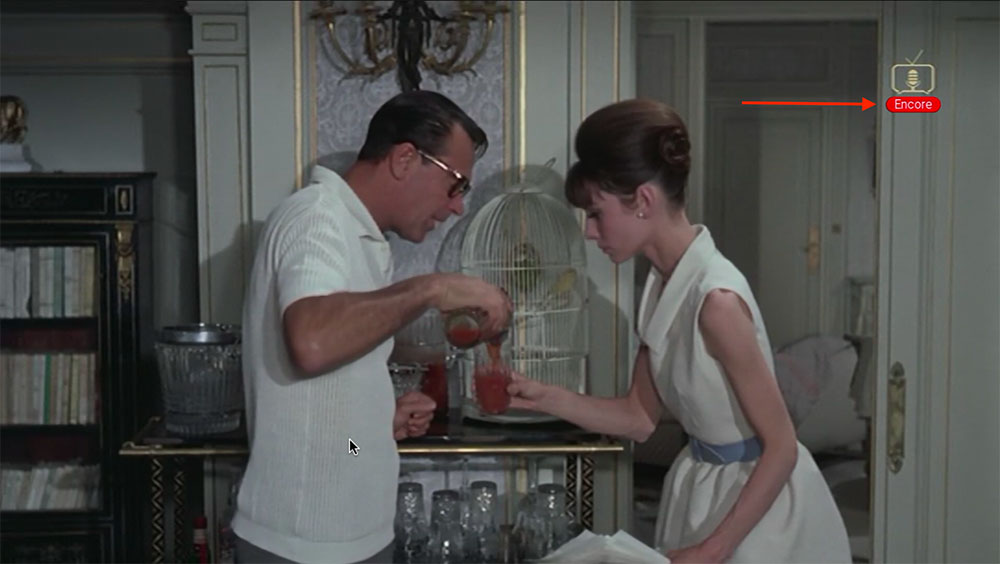
Most Freeview connected TVs and set top boxes can receive the service. The best way to check is to make sure your device is connected to the internet, either by a wire to the router or on WiFi and then to go to Talking Pictures on Channel 82 and see if you see an Encore logo underneath the channel bug.
How do I connect my TV to the internet?
Go into the settings of your TV and find ‘Network’, then select your WiFi and enter the password to connect. Alternatively, some TVs can be cabled directly into your router.
How do I know if my TV can connect to the internet?
Most modern TVs can connect to the internet, check the settings of the TV and look for Network or similar. Also, some TVs come with a sticker that says Freeview Play Ready, which means it is definitely able to connect to the internet.
I have a YouView set top box, will Encore work on this?
Unfortunately, YouView isn’t compatible with Encore at the moment.
How can I tell if my device is compatible with the service?
If the device is connected to the internet and the red ‘Encore’ logo appears on channel 82 then you can connect.
Unfortunately, some older TVs can connect to the internet but don’t run the right technology to be compatible.
If you are a real tech guru then you need to find out if your TV is HbbTV compatible, which is the technology used to launch the service. Also, some TVs come with a sticker that says “Freeview Play Ready”, which means it is definitely able to connect to Encore.
How do I access Encore on my connected TV?
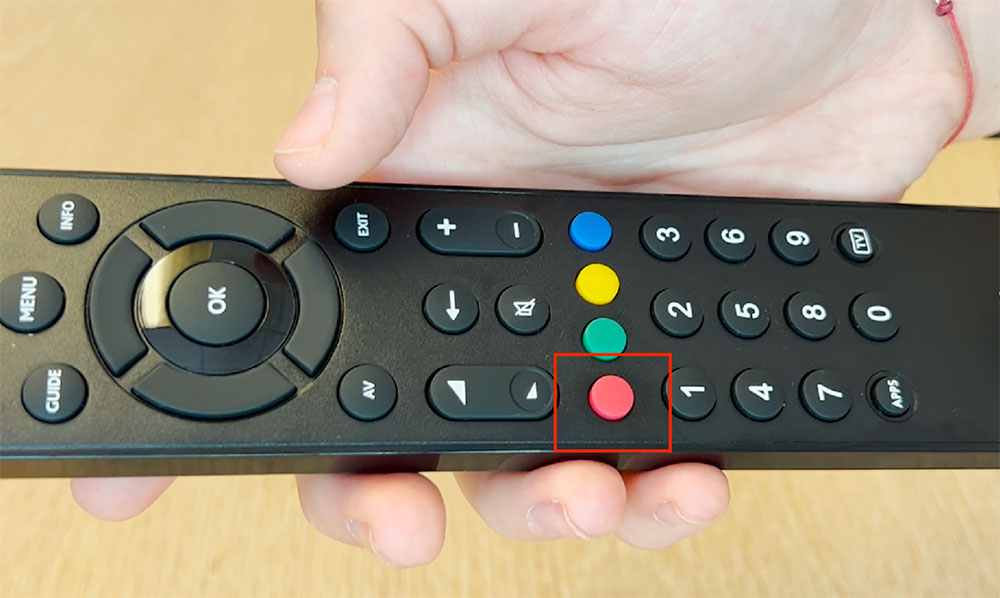
When on channel 82, simply press the red button on your remote control to launch the service.
Why does it take a long time to load?
It’s complicated! The first time the service loads in a new area it has to download all of the posters and information and this can take some time. Once this is done, and more people are using the service, the load time should be just a couple of seconds.
Why do I see “GDPR stuff”?
It’s a bit like loading a website with cookies. We need to be able to send information over to you and you are essentially giving us permission to do so.

How do I watch subtitles?
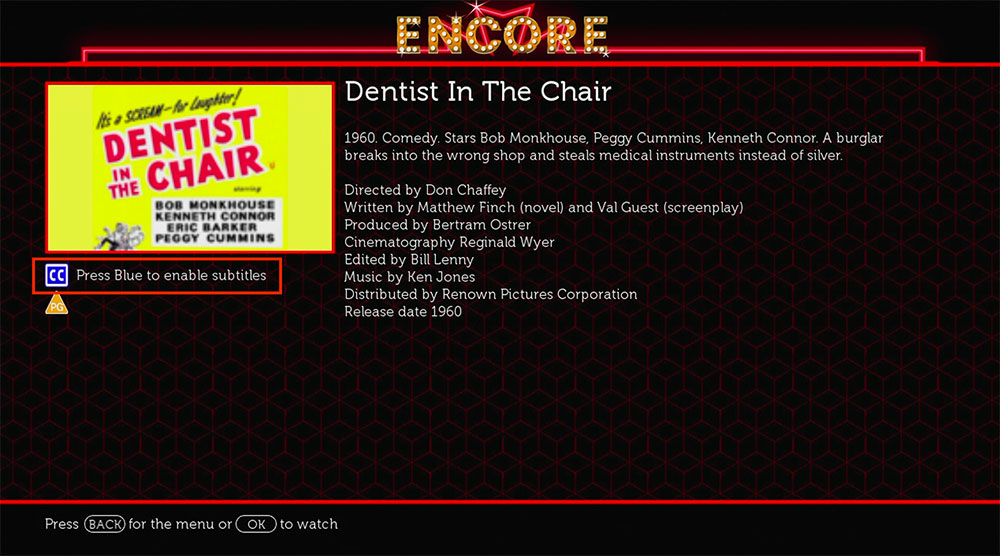
If the show has subtitles then there will be a blue “CC” logo in the film’s information page. Simply press the blue button on your remote control and subtitles will be enabled.
How long is content available for?
It varies from title to title. Generally content in the Limited Release carousels are on the service for 7 days, due to licensing agreements, however most of the content is available 24/7/365!
Why do you sometimes only have one episode of some series available at a time?
This will be to do with the licensing agreement in place between Talking Pictures TV and the rights owner.
Where would I find content that I have missed on the channel?
New content will appear in one of three places: the “New to Encore”, “Limited
Release Films” and Limited Release TV”, which are the top three carousels when you enter the service.
Where can I watch film collections such as The Cellar Club or The Footage Detectives?
There are lots of carousels of content on the service. You can scroll down through these using the arrow keys on your remote control.
Why is some content that airs on the channel not available on Encore?
Not everything comes with the right license to allow us to put it on a catch up service.
How do I pause?
Press the OK button on your remote control and press it again to resume.
How do I search for content?
Press the yellow button on your remote control, when on the home screen of the application, and you will be taken to the search function. Use the arrow keys, on your remote, to enter your search term and then move to the “OK” button to start the search.
What if I want to browse films/TV shows from a certain era?
If you go to the Search function (green button on the home screen), then you can search by year e.g. 1949 or by decade e.g. 1940s or 40s.
How do I access complete TV series from the homepage?
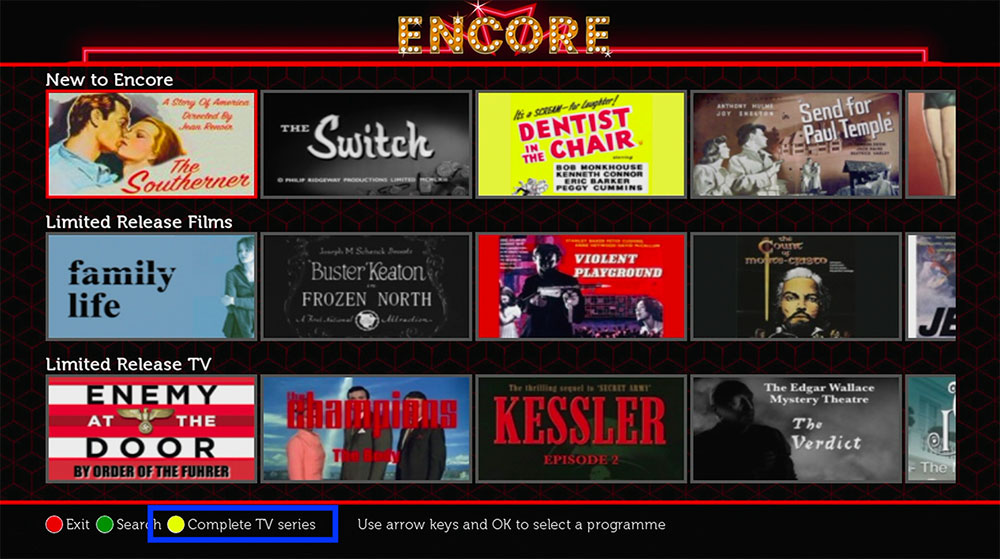
Press the yellow button on your remote control and you will be taken to the TV series page. Click into a series to see all the episodes.
Why is there advertising on the service?
It’s important to us that the service remains free and showing advertising allows us to do this.
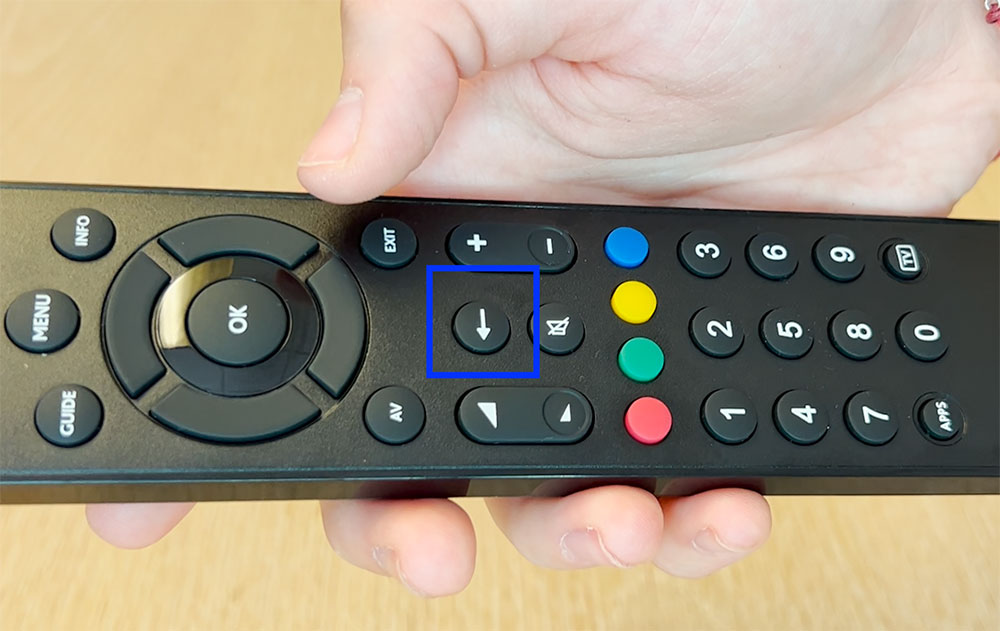
How do I go back a page?
Press the back button, or on some remote controls it is a left facing arrow , and you will be taken back to the previous page.
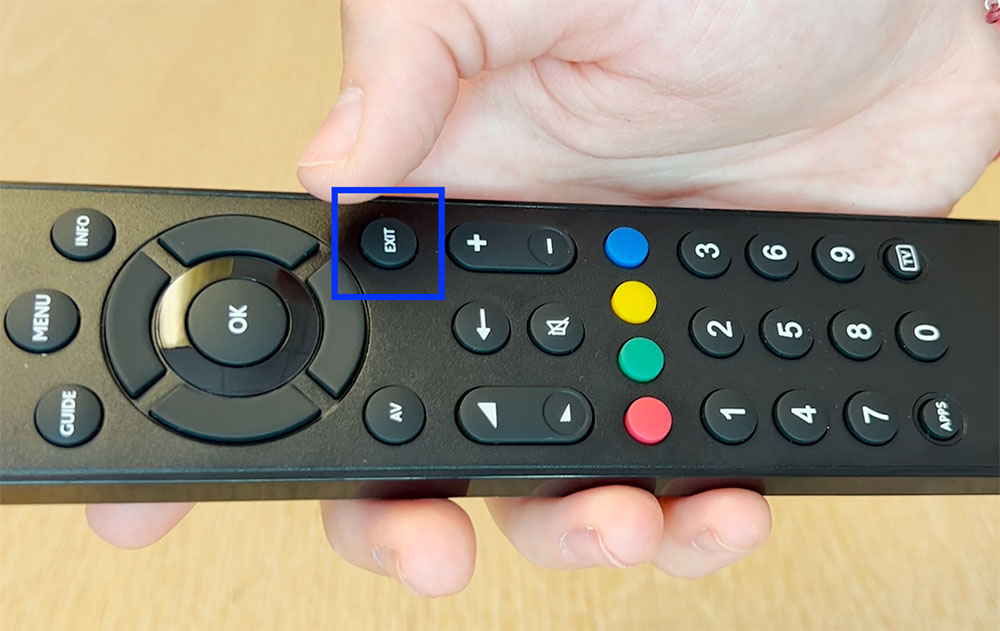
How do I get back onto the channel itself?
Press the “exit” button on your remote control or press the red button again to exit the application.
Can I pick up a show from where I left off?
At the moment it isn’t possible to resume a film if you have left the film’s page. We are working on this for the next phase of Encore.
How long after broadcast is new content available on the Encore Red Button service?
Once a show has aired on the channel, it will be on the service within an hour and often quicker.
Encore doesn't work on my Smart TV anymore.
If you usually watch Encore via the Red Button service on your smart TV, but it's no loner working, it's worth unplugging your TV from the mains for 60 seconds and then plugging it back in again. It may sound cliché, but this can clear your TV's cache and amend a lot of anomalies. If you continue to have problems, please contact support@tptvencore.com
My Hisense/TLC Roku TV isn't playing films properly
We are aware of a recent software update for these TVs that has affected some of these models' ability to communicate with our Red Button service. Feel free to contact us at support@tptvencore.com if this is happening to you, or contact Hisense/TLC to let them know.
Is it available outside of the UK?
Yes, but not all content, it depends on the specific rights we have for that film or TV series.
Is there advertising during the films/ shows?
Yes, there's advertising on the service. It’s important to us that the has free offering for everyone, and this is the only way to allow this.
How do I search for films and TV shows?
Click on the magnifying glass icon in the top right of the homepage to search for the content you want to see. You can search by genre, actor, director or film or TV series title.

Why do I have to register for TPTV Encore?
Having a TPTV Encore account enables the service to log what each user was last viewing and is then able to start the film from where they left it.
How do I make a suggestion for TPTV Encore?
E-mail support@tptvencore.com and we will see what we can do to add the shows you are looking for.
Why have some films or TV series been removed from the service?
Some films and TV series have specific ‘rights windows’ during which we can include them on the service, which is down to the specific agreement with the individual rights owners. For example, some films may have a 7-day ‘catch-up’ window, after the show has been on the channel and we can only include the show on TPTV Encore during that time.
I'm trying to register to TPTV Encore, but it's telling me my email is invalid
This error message usually only comes up when a space has accidentally been entered in the box you’re entering your email address, so we ask you to double check that no rogue spaces have been left in, at the start or end, after copying and pasting your email address. This tends to be the case with all instances of this error message occurring.
I'm trying to log in, but it's telling me my password is case sensitive?
The error message telling you the password is case sensitive is just a reminder that the box where you enter your password is case sensitive, which means you must enter each letter case (Upper case/Lower case) as you did when the password was created. For example if you created your password as ‘PigGoat22’ it needs to be entered like that, and it won’t accept ‘piggoat22’. Any tool that supports text input might support case-sensitive input. That said it sounds like you’re just entering your password wrong, or maybe you made a typo when creating it during the registration process? If this doesn't help, you may want to simply reset your password.
Why can't I watch some films with my VPN on?
Your VPN stores your identity on a server, and replaces it with another, tricking the internet into thinking you are in a different country. Due to licensing agreements, our limited release content is only available in United Kingdom and Ireland (as noted in the video's description). Even if you are within the UK or Ireland, your VPN will tell our website that you are actually located in another country, forcing our website to make the Limited Release content unavailable to you.


